Industry workflows
Drone operations for Real Estate
Turn the property brief into a usable media package. Keep must-have views, privacy exclusions and client selection together so your team can handle revisions without repeating the whole shoot.
Bring the workflow, responsible people and the handoff you want to improve. Our team will review your request and follow up by email.
Agree the evidence and the person who will use it.
A useful brief names the required result, operating constraints and review responsibility.
Property boundary, exterior shot list, access, privacy exclusions, intended channels and usage rights.
- Define the requested output and its intended recipient.
- Confirm access, readiness and the responsible operating roles.
- Record exclusions and the decision needed when evidence is missing.
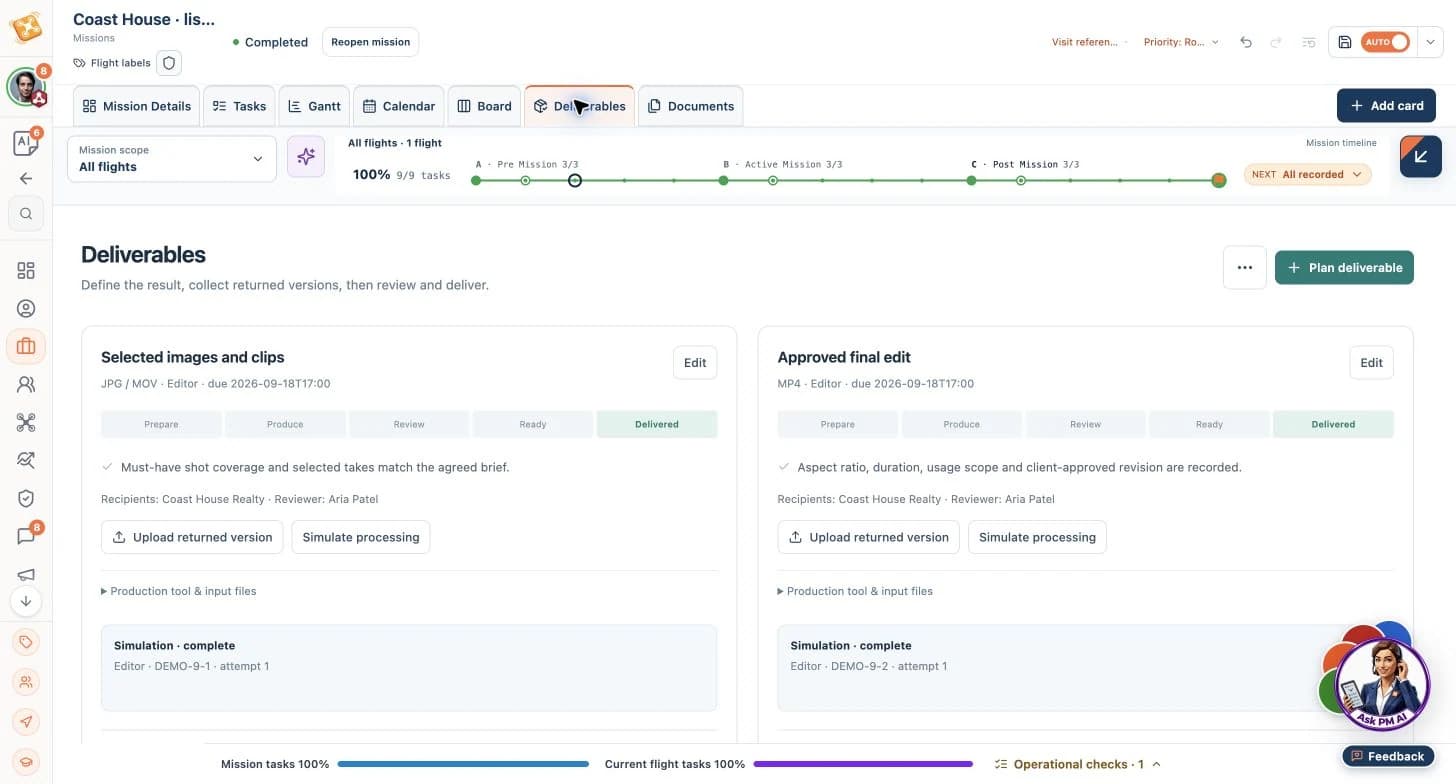
Coast House · property media
Follow the brief through preparation, a consequential choice and a reviewed output.
Illustrative workflow · AI advances routine execution; your team owns critical decisions.
Coast House · property media
Illustrative product workflow. Sample screens show the named operating context; they are not customer results.
Prepare the work
- Input
- Property boundary, exterior shot list, access, privacy exclusions, intended channels and usage rights.
- Product or agent contribution
- PM organizes the shoot and selection tasks around the brief; the operator confirms conditions, permissions and capture suitability.
Resulting output
A reviewed scope, readiness checks and a named next-action owner.
Review and hand off
- Input
- Source evidence and the agreed acceptance criteria.
- Product or agent contribution
- AI organizes the evidence references, versions and specific review follow-ups so the team can close gaps without restarting the brief.
Resulting output
Original photographs and clips, shot-list references, selected JPG/MOV material, the approved MP4 edit and recorded usage rights for the agreed publication.
Resources for this operating context
11 relevant entries in the curated collection: 2 core workflows and 9 worked examples. Start with these previews.
Choose a workflow by its intended scope and expected output. Worked examples illustrate specific situations; adapt them to your operation and qualified review requirements.
Roof & Façade Inspections
Deliver an organized inspection record with every agreed surface, observation and inaccessible area accounted for. Use the prepared workflow to turn the brief into preparation and follow-up tasks, reducing administrative effort while qualified reviewers assess findings and approve delivery.
Core workflow
Preview workflowPost-Storm Site Assessments
Prioritize affected assets and deliver an indexed record of visible changes, urgent observations and inaccessible areas. Use the prepared workflow to organize preparation and follow-up actions, reducing coordination effort while site assessors interpret the evidence and determine the response.
Core workflow
Preview workflowBuilding Capture & Selective Roof Recapture
Coordinate roof, crossed-grid and façade capture while keeping rejected attempts separate from the files selected for delivery. Use this example to organize capture requirements and recapture follow-ups, reducing handoff confusion and avoidable return visits while the pilot approves changes.
Worked example
Preview workflow
Worked examples illustrate workflows, not customer endorsements. Processing, technical interpretation and critical operating decisions remain with the responsible people and tools.
Carry your industry into your first step
Explore authored mission templates relevant to Real Estate, including capture instructions, expected evidence and review requirements.
Bring the workflow, responsible people and the handoff you want to improve. Our team will review your request and follow up by email.